Setup of Dynamic Web Project using Maven
Today I want to talk about Maven. It’s very powerful instrument and if you know how to use it you will make minimum effort to achieve maximum result. In general Maven helps you to manage a project including library dependencies, building process and etc… But in the article I’m going to show you one of the ways how to create a Dynamic Web Project using Maven (in Eclipse IDE).
Pre-requirements:
- Eclipse IDE for Java EE Developers
- M2E plugin for Eclipse
- Maven
1. File > New (Alt+Shift+N) > Dynamic Web Project
- Input some name for the project in the “Project name” field (e.g. mavenDWP);
- Select some “Target runtime” (I use Apache Tomcat 7.0);
- Click on the “Next” button;
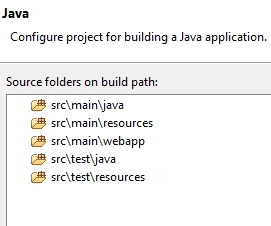
- Create the following directory structure (please pay attention to the directory structure. It’s an important detail in the creation of Dynamic Web Project):
- Click on the “Next” button;
- Select the “Generate web.xml deployment descriptor” check-box;
- Click on the “Finish” button.
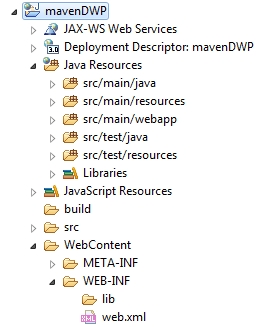
2. Right click on the project > Configure > Convert to Maven Project
- Select “Packaging” as a WAR;
- Click on the “Finish” button;
- After that, pom.xml will appear in the project’s structure;
- Move all stuff from the WebContent folder to src/main/webapp;
- WebContent folder can be deleted after that.
3. Open the project’s root folder in the file system
- Execute the following command: mvn eclipse:eclipse -Dwtpversion=2.0
- This command will generate a configuration for eclipse (.classpath, .project, etc.).
- Expand src > main and make a right click on the webapp folder: Build Path > Use as Source Folder (This point is actual only if src/main/webapp disappeared from the source folders).
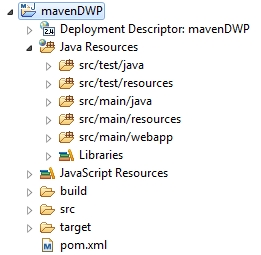
Here is the final view of the Dynamic Web Project configured with Maven:
That’s it. I hope this tutorial was clear enough and you will be able to set up everything described above without any problems. I will try to answer on every question in the comments.